
Utool Manual
The Swiss Army Knife of Underspecification
Introduction
Over the past fifteen years, underspecification has become the standard approach to dealing with scope ambiguities: Almost every large-scale handcrafted grammar that supports semantics construction uses it in some form or another. This is primarily because it allows the grammar writer to separate the problem of semantic ambiguity from the problem of (underspecified) semantics construction: The grammar only derives an underspecified description of all semantic readings, and the responsibility for actually enumerating the individual readings is delegated to a later stage of processing. Because the enumeration process can be delayed until it is actually needed, and readings that contradict our world and context knowledge could be eliminated by that time, underspecification also has the potential to speed up processing of ambiguities.
This document describes Utool (the Swiss Army Knife of Underspecification), a tool that is designed to perform a number of operations that arise when working with underspecified descriptions (or USRs, underspecified semantic representations). Its main two functions are to solve an underspecified description (i.e., to enumerate all readings from a description) and to convert descriptions between different underspecification formalisms (such as dominance constraints, MRS, and Hole Semantics). In addition, it can perform a number of smaller tasks, such as deciding solvability, counting readings, and determining whether a description belongs to a class with specific useful properties.
Utool was developed in the context of the CHORUS project in the SFB (Collaborative Research Centre) 378 “Ressource-adaptive cognitive processes”, which was funded by the German Research Organisation (DFG). We developed a version in C++ in 2004-05. Then we ported release 2.0.1 of the old utool to Java in 2006. The Java version 3.0 is superior to the C++ system in many respects: It is much cleaner, more portable, easier to distribute, has more functionality and better error handling, comes with an integrated GUI, and on some platforms it is even faster. Version 3.1 adds significantly improved GUI support and various other improvements. Utool requires Java SE 5.0 or higher to run or compile.
Technically, Utool is a collection of front-ends to a common underlying library for working with labelled dominance graphs, which can be used independently in other Java programs. Utool itself comes with three different front-ends: It can be run as a command-line tool; it can be run in a server mode in which it will accept instructions over a network; and it can be run as the Underspecification Workbench (Ubench), which offers the complete functionality of Utool in a convenient GUI. We distribute Utool 3.1 under the Gnu Public Licence (GPL), although this might change in a future release.
This document is not an introduction to underspecification. We and others have written many research papers about this topic area, and we cannot do it justice in a system manual. For an overview, we refer you to the following literature:
give a very readable introduction to underspecification in the Hole Semantics framework in their textbook on computational semantics.
gave the first overview of the ideas behind underspecification and some early formalisms. This book is ten years old, and many details are now obsolete, but it can still serve as a good starting point.
introduce Minimal Recursion Semantics, which is used in the current large-scale HPSG grammars. The paper is interesting because it is about an underspecification formalism that is in widespread use, and because it talks a lot about semantics construction in an underspecification context.
define dominance constraints and show how to do semantics construction for it. The dominance graphs Utool works with are based on dominance constraints, and if you come from a linguistic background, this paper will perhaps be most helpful for you to get an idea of what dominance constraints do.
give a (very short) overview of the development of solvers for dominance constraints and dominance graphs, and point to some recent literature. Utool implements the chart-based graph solver introduced in that paper.
This document is structured as follows. We will first give a tutorial introduction to Utool in Section 2. Then we will explain the operations supported by the command-line and server versions of Utool, and the different ways in which Utool can be called, in Section 3. Section 4 is devoted to the codecs which make it possible for utool to read and write underspecified descriptions from different formalisms; it also hints at the theory behind the conversions and provides pointers to the literature. Section 5 contains some tips and tricks for using Utool in practice. Finally, Section 6 explains how to recompile a modified version of Utool, and Section 7 concludes.
A tutorial walkthrough
Welcome to the Utool tutorial! In this tutorial, we will walk you through some of the basic operations that Utool supports.
Installation
Utool is distributed as a Java package with the filename
Utool-<version>.jar. After downloading it from
the website, you can simply run it as follows:1
$ java -jar Utool-3.1.jar
Usage: java -jar Utool.jar <subcommand> [options] [args]
Type `utool help <subcommand>' for help on a specific subcommand.
Type `utool --help-options' for a list of global options.
Type `utool --display-codecs' for a list of supported codecs.

Available subcommands:
    solve        Solve an underspecified description.
    solvable     Check solvability without enumerating solutions.
    convert      Convert underspecified description from one format to another.
    classify     Check whether a description belongs to special classes.
    display      Start the Underspecification Workbench GUI.
    server       Start Utool in server mode.
    help         Display help on a command.

Utool is the Swiss Army Knife of Underspecification (Java version).
For more information, see www.coli.uni-sb.de/projects/chorus/utool/
This assumes that you have installed Java 5.0 or higher and it is in your path. You can move the Jar to any directory you like and then pass the pathname of the file to Java. You could also define an shell alias for calling Utool more conveniently if you like, e.g. as follows (on a bash shell):
$ alias utool='java -jar /usr/local/Utool-3.1.jar'
$ utool
Usage: java -jar Utool.jar <subcommand> [options] [args]
Type `utool help <subcommand>' for help on a specific subcommand.
Type `utool --help-options' for a list of global options.
Type `utool --display-codecs' for a list of supported codecs.
...
For the rest of this tutorial, we will only write
utool for the call to the Utool main program, for
easier readability. You can either define the alias, or expand
utool to the appropriate
java -jar Utool-3.1.jar call yourself.
The Underspecification Workbench
The most convenient way to work with Utool is via Ubench, the Underspecification Workbench. This is a GUI that will visualise USRs for you and offers access to almost the entire functionality of Utool.
Opening examples
You can start Ubench like so:
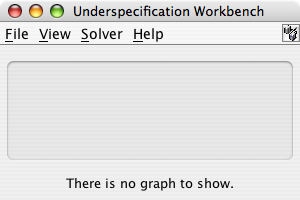
$ utool displayThis will open a window that looks as follows:
Now let’s have a look at an example. Utool comes with a number
of built-in examples, which you can access from Ubench via the
File/Open Example menu. So go to this menu, and load the example
holesemantics-14.hs.pl. This is a Hole Semantics USR
for the sentence “Every man in a restaurant knows a woman with a
car”, in the Prolog format used in the Blackburn and Bos textbook
(Blackburn
and Bos 2005). Ubench will internally convert this USR into
a labelled dominance graph and then draw it as follows:
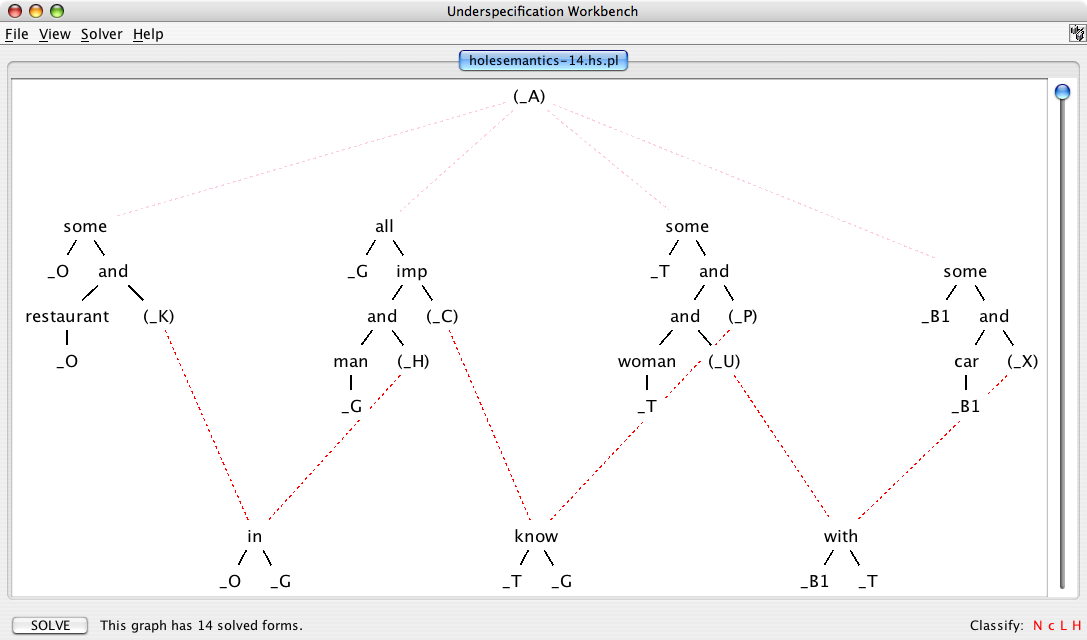
The window displays some interesting information below the dominance graph. In the lower right corner, you will see the letters “N c L H”. These letters express the membership of the graph in a number of graph classes: If you mouse-over the letters, you will see that the graph is normal, compactifiable, leaf-labelled, and hypernormally connected. (These notions are explained e.g. in .) This is nice but unsurprising: The translations from Hole Semantics and MRS require the resulting dominance graph to be leaf-labelled and hypernormally connected, because these are formal prerequisites of the correctness of the translations. If the USR hadn’t been of this form, Ubench would have refused to translate it and displayed an error message.
Solving dominance graphs
In addition, the status bar claims that this dominance graph has 14 solved forms. A solved form is an arrangement of the tree fragments (the subgraphs that are connected by solid edges) into a forest, in such a way that if there is a path from node to node in the dominance graph (via any kinds of edges), there is still a path from to in the solved form. You can look at them by clicking on the “Solve” button in the lower left. The result will look as follows:
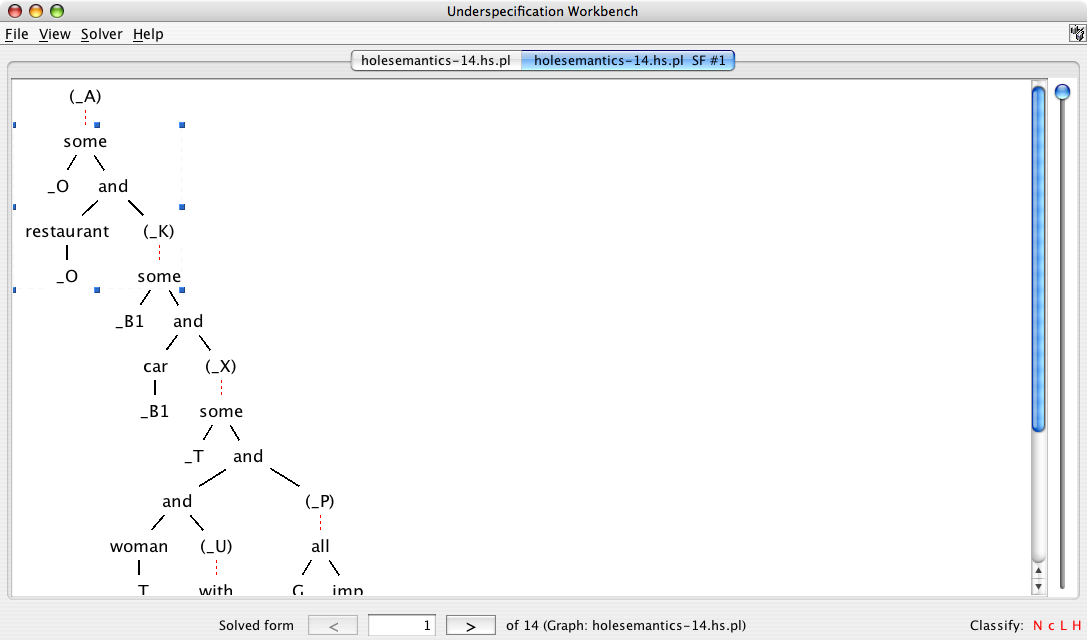
As you can see, Ubench opened a new tab “holesemantics-14.hs.pl SF #1”, which displays the first solved form of the graph. In linguistic terms, the solved form represents one of the scope readings, in which the different quantifiers have been assigned one particular scoping. You can see that the solved form may still contain (dotted) dominance edges. But because the original graph was hypernormally connected, you can imagine that they can all be removed and the result is a tree that only consists of tree edges and represents a formula of first-order predicate logic. In technical terms, this is a configuration of the original graph; again, see e.g. for details.
Notice that the status bar of a solved form is different than that of an unsolved dominance graph: It now displays the index of the solved form among all solved forms of this graph, and arrows for moving back and forth between the different solved forms. Go ahead and look at some solved forms.
Exporting graphs and solved forms
As we have said above, Utool works internally with labelled
dominance graphs. It uses modules called input codecs to
map string representations of USRs in some formalism into labelled
dominance graphs. When you opened the example
holesemantics-14.hs.pl earlier, Ubench recognised
that the filename extension .hs.pl is associated with
the holesem-comsem input codec, and used this codec
to translate the contents of the file into the graph it displayed
for you (Koller,
Niehren, and Thater 2003). Utool is distributed with a
number of different input codecs. Some of these (e.g. the ones
that deal with various concrete syntaxes of dominance graphs) are
rather trivial, whereas others (e.g. the MRS input codecs) are
quite sophisticated and needed to be proved correct (Fuchss et al.
2004).
Utool also comes with several output codecs, which
solve the converse task of computing a string representation for a
labelled dominance graph. Let’s have a look at these for a moment.
Go back to the “holesemantics-14.hs.pl” tab, and choose
File/Export from the menu. If you open the “file format” dropdown
menu, you will see the list of output codecs that Ubench is aware
of. One thing you can try here is to select the
domgraph-dot output codec, which exports the current
dominance graph in the “dot” graph format. Then you can use a
graph-drawing tool that can deal with dot files, such as Graphviz,
to visualise the graph.
Alternatively, you can make Ubench write all solved forms of
the current dominance graph into a file. Choose File/Export Solved
Forms from the menu and choose, for instance, the
term-prolog output codec. This will save all solved
forms of the graph as a list of Prolog terms, as they would
e.g. be computed by the Blackburn and Bos USR solver.
You can display a list of all installed codecs by selecting
Help/Show All Codecs in the Ubench menu, or by calling
utool --display-codecs on the command line. You can
also extend Utool/Ubench quite easily by implementing your own
codecs. This is described in more detail in Section 4.
Redundancy elimination
Let’s finish off the Ubench section of this tutorial with a more advanced operation. Utool is able to modify an underspecified representation in such a way that readings are removed if they are equivalent to some other reading that is still described by the USR. This can be very useful in practice. Consider the following sentence (this is Sentence 1262 from the Rondane Corpus):
For travellers going to Finnmark there is a bus service from Oslo to Alta through Sweden.
According to the English Resource Grammar (ERG; ), this sentence has got 3960 scope readings. However, this ambiguity only comes from the fact that the ERG analyses proper names as potentially scope-bearing quantifiers, and the only difference between the different readings is the relative scope of these proper-name “quantifiers”. More generally, we can say that all readings of the sentence are semantically equivalent, and it would be desirable to remove 3959 of these equivalent readings and retain only a single representative. And while the redundancy in this particular example comes only from spurious scope ambiguities between proper names, the problem of reducing the number of logically equivalent reading is not restricted to them and also covers ambiguities between e.g. different existential quantifiers or different universal quantifiers.
Utool implements a redundancy elimination algorithm, which will modify a USR in such a way that readings that are semantically equivalent to remaining readings are deleted. It does this without ever enumerating readings, and is thus very efficient (Koller and Thater 2006). At the same time, it is very effective: It reduces the median number of readings on the Rondane Treebank from 55 to 4. Let’s try it out.
The first thing you will need is a file that defines equivalences. One such file is distributed with Utool. In order to access it, unpack the Utool Jar file by typing the following command in some directory:
$ jar xf Utool-3.1.jarThis will create, among many others, a file
erg-examples.xml in the directory
examples. This file contains an equivalence
definition that is appropriate for the Minimal Recursion Semantics
USRs that are computed by the English Resource Grammar (Ann
Copestake and Flickinger 2000). Remember the pathname of
this file for now.
Now go back to Ubench and open the example
rondane-1262.mrs.pl in Ubench; the filename extension
.mrs.pl is connected to the mrs-prolog
input codec, which will read MRS representations in the Prolog
format used by the ERG. As you are already familiar with, Ubench
will translate the USR into a labelled dominance graph and display
it. Select the entry “View/Display Chart” from the menu. This will
open a new window that looks as follows:
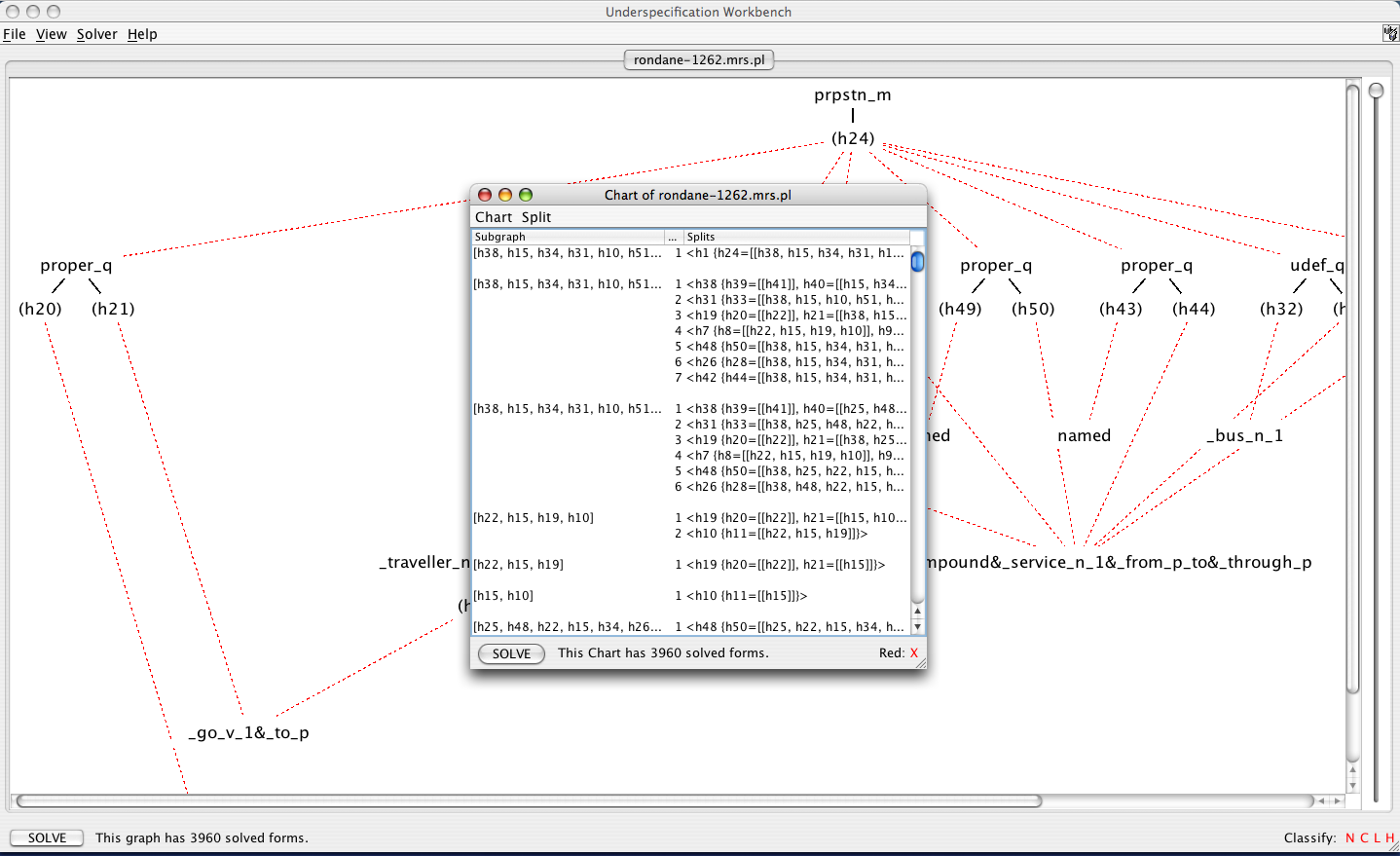
The new windows displays the dominance chart for the
dominance graph. The dominance chart is an internal representation
of the set of all solved forms that’s more explicit and not quite
as compact at the dominance graph itself, but still much smaller
than the set of solved forms itself ( – see also Fig. 4). The chart is
interesting in itself, and you can play with it a bit (try
clicking on the different entries to highlight subgraphs), but for
our current purposes, the main point is that it is on the level of
charts that we can do the redundancy elimination. So choose
Chart/Reduce Chart from the menu of the chart window, and select
the file erg-examples.xml that you unpacked from the
Jar file earlier. After a moment, most entries will have been
deleted from the chart, and the status bar will say that the
(smaller) chart represents only a single solved form, rather than
the 3960 solved forms that the original chart represented. You can
click on the “solve” button to display this single solved form. As
you can see, Ubench just modified a USR in order to represent a
much smaller set of readings, and it did this without computing
the individual readings. From our perspective, this ability to
eliminate irrelevant readings that were technically predicted by
the grammar but not intended in the particular situation is the
main reason why underspecification is important.
If you find that you’re working with redundancy elimination a lot, and you’re using the same equivalence files repeatedly, you can set a global equivalence file in the Solver menu. You can then use it conveniently from every chart window by using the menu entry “Reduce with global equivalence system”.
Running Utool from the command line
All the functionality that you have just explored from the GUI
is also available on the command line. By way of example, let’s
solve the example file chain3.clls, which comes with
Utool. This is the pure chain of length 3; it is shown in
Fig. 1), and you can also look at it
via Ubench. This graph is solvable, and has five solved forms.
In order to enumerate the solved forms of
chain3.clls, you can call Utool as follows:
$ utool solve -O term-prolog ex:chain3.clls
f1(a0,f2(a1,f3(a2,a3)))
f1(a0,f3(f2(a1,a2),a3))
f2(f1(a0,a1),f3(a2,a3))
f3(f2(f1(a0,a1),a2),a3)
f3(f1(a0,f2(a1,a2)),a3)
As you can see, the Utool command line consists of four parts:
utool(orjava -jar Utool-3.1.jar): This instructs Java to load the Jar file and run its main class. You can pass further arguments to the Java VM by putting them before the-jaroption.solve: This is the command that Utool should execute. In the example, we have run thesolvecommand, which enumerates all solved forms of the USR and prints them. There are six other commands –solvable,convert,classify,display,server, andhelp– which perform different tasks. They are described in detail in Section 3.-O term-prolog: After the command, you can specify options. The option-O term-prolog(or, equivalently,--output-codec term-prolog) specifies that thesolvecommand should encode the solved forms using theterm-prologoutput codec. You could have specified the input codec with the-Ior--input-codecoption, but Utool already inferred that it should use the input codecdomcon-ozfrom the filename extension.clls.ex:chain3.clls: Finally, you can specify where the input USR should come from. In this example, we have usedex:chain3.clls. This tells Utool that it should look inside its Jar file for a resource with the nameexamples/chain3.cllsand read the USR from there. Alternatively, you can specify an ordinary filename here, and Utool will read the input USR from your file system. You can also pass a hyphen (-) for this argument to make Utool read its input from standard input.
Some USRs have a lot of readings, and you either don’t want to
see them all, or it takes too long to enumerate them, but are
still curious about how many readings the USR has. This is what
the solvable command is for. You run it as
follows:
$ utool solvable -s ex:thatwould.clls
The input graph is normal.
The input graph is not compact, but I will compactify it for you.

Solving graph ... it is solvable.
Splits in chart: 650
Time to build chart: 105 ms
Number of solved forms: 64764
As you can see, we have now instructed Utool to run the
solvable command on the input USR
ex:thatwould.clls. In addition, we have specified the
-s (or --display-statistics) option to
get more informative output. Notice that we didn’t have to specify
an output codec, because solvable doesn’t output USRs
or readings.
Utool has computed a dominance chart with 650 entries and
established that this chart represents a set of 64764 solved
forms. However, it has not actually computed the solved forms
themselves. (This is what solve would have done after
computing the chart.) It has also set an exit code of 1
because the graph is solvable (has solved forms), so if you are
using a bash shell, you can do the following immediately after the
utool call:
$ echo $?
1
If you want to give your computer a challenge, we encourage you
to run solvable on the input
ex:rondane-650.mrs.pl, an MRS USR representing more
than two trillion readings. You will have to increase Java’s
memory limit by passing it the option -Xmx512m to
avoid “out of memory” errors.
Two further Utool commands are convert and
classify, which allow you to convert USRs into other
formalisms (comparable to opening a USR and then exporting it
using a different codec in Ubench) and to determine their
membership in various graph classes (a more sophisticated version
of Ubench’s “N C L H” display in the status bar). We will not
cover these commands in this tutorial. However, it is worth
pointing out that you can always get help on the command-line
usage of Ubench using the help command:
$ utool helpwill display an overview of possible commands, whereas
$ utool help solvewill display help on how to use the solve command
(and similarly for the other commands).
The Utool Server
The third way of running Utool is in a server mode. In server mode, Utool keeps running indefinitely; it accepts commands via a socket, executes these commands, and sends the results back through the socket. You can start Utool in server mode from Ubench by clicking on the server icon in the top right corner, or from the command line as follows:
$ utool serverThis will open a socket on port 2802 of your machine and listen to commands sent to this port. If you have Perl installed on your system, you can test the Utool Server using the demo client we have included in the distribution. Keep the Utool server process running, change to the directory where you unpacked the Jar earlier, and execute the following command:
$ perl tools/client/utool-client.pl solve -I domcon-oz -O term-prolog \
         examples/chain3.clls
f1(a0,f2(a1,f3(a2,a3)))
f1(a0,f3(f2(a1,a2),a3))
f2(f1(a0,a1),f3(a2,a3))
f3(f2(f1(a0,a1),a2),a3)
f3(f1(a0,f2(a1,a2)),a3)
The server supports exactly the same commands as the command-line version (except that you can’t use it to start another server). However, it has the advantage that you need to run only a single process to execute any number of commands, whereas you must start a new Java process for each new command when you use the command-line tool. This saves runtime if you need to run a large number of successive commands, such as when classifying all USRs in a corpus: You don’t have the overhead for starting Java, and the programme will also become faster over time because the Java system has the opportunity to just-in-time compile the Java bytecode.
Using Utool
As you have seen in the tutorial, the Ubench GUI is rather straightforward to use. The tutorial has walked you through most of its functionality, and while it is by no means a complete documentation and there are various other aspects that we have not mentioned, it is probably enough for you to find your way around the rest by yourself.
However, the command-line and server modes of Utool are less self-explanatory. This chapter documents how to use them in more detail.
In the current release, Utool supports six commands:
solve, solvable, classify,
convert, server, and
display. Each of these commands can be used from the
command-line or in the Utool Server (but running the
server command in the Utool Server doesn’t do
anything). In addition, Utool supports several auxiliary
pseudo-commands, which display help information.
Command-line interface
When Utool is run from the command-line, it executes the single
command you specify on the command line and then exits. For
instance, the following call executes one solvable
command and outputs some information about it:
$ utool solvable -s examples/chain3.cllsCommands typically require arguments (in the example,
the filename chain3.clls of the USR that we want to
solve), and accept certain options (here, the
-s option, which instructs Utool to display
statistical information). These arguments and options are written
after the command on the command line.
Server mode
Alternatively, you can run Utool in server mode. In this mode, it will not execute any commands at first. Instead, it will accept network connections on a specific socket. Each time it is sent a command on this socket, it will execute this command, send the results back over the socket, and then close the socket. But the same Utool process keeps running and can execute many commands during its lifetime.
You start Utool in server mode by making Utool execute the
server command:
$ utool serverAlternatively, you can also click the server button in the top
right corner of a Ubench window to start or stop a server thread.
The server doesn’t output anything on the console on which you
started it – unless you specified the --logging
command-line option and no name for the logfile, in which case it
will write some information to standard error.
By default, the server will listen for socket connections on
port 2802, but the port can be specified using the
--port option. The protocol for communicating with
the server is as follows:
The client sends a command in an XML element of the following form:
<utool cmd="..." (more options)>
  (arguments of the command)
</utool>
The command, options, and arguments in this XML element correspond to the command, options, and arguments of a single run of the command-line tool.
Once you have transmitted a complete
utoolelement (i.e., after the closing</utool>tag), the Utool Server processes the command. You may optionally close your side of the socket using theshutdownfunction to notify the server that you’re finished writing, but this is no longer necessary. Notice that you don’t want toclosethe socket yet at this point.If the command is executed successfully, the server will respond with a message of the following form:
<result .... />The particular attributes of this element depend on the command, and are described below. If an error occurred, the response will be a message of the following form instead:
<error code="..." explanation="..." />Here the “code” attribute will be a numeric error code, and the “explanation” attribute will be a plain-text explanation of the error that occurred.
The server closes the socket.
If you just use Utool for a single call or experimentation, the command-line mode will typically be easier to use. However, if you need to process many Utool commands from a programme, it can be dramatically more efficient to keep a single Utool Server process running and send the commands to the server (see Section 5.1). We present a demo client for the Utool Server in Section 5.2.
Notice that you’ll need to use XML character entities when you send your USR to the server, and conversely decode the result that you get back. See Section 5.1 for some more hints on this.
Passing USRs
Most commands require the user to specify an USR that should be processed.
In command-line mode, you pass a specification of the USR as a
command-line argument. If this specification starts with
ex:, it is taken to represent one of the USRs that
come bundled with Utool. For instance, when we used the
specification ex:holesemantics-14.hs.pl in the
tutorial, this instructed Utool to look for an example with the
name holesemantics-14.hs.pl in the Jar file.
If the specification doesn’t start with ex:, then
it is up to the input codec how to interpret it. Most codecs take
it to be a filename, and will attempt to read the USR from the
file with this name. This is what happens when you unpack the Jar
file and then execute
utool solvable examples/chain3.clls. The only codec
that is currently distributed with Utool that interprets its input
specification differently is the chain codec, which
interprets the string as the numeric chain length and not as a
filename.
In server mode, you can’t pass a filename because the server
may run on a different machine than the client and may not have
access to its filesystem. Instead, you pass the USR directly as an
attribute of a usr element that is embedded into the
utool element, like so:
<utool cmd="solvable">
  <usr codec="domcon-oz" string="[label(x f(y)) ...]" />
</utool>
The ex: syntax is not available in server mode.
Notice that the attribute values must be valid XML attribute
strings. This means that you must replace special characters by
their respective character entities (see also Section 5 for tips on this).
Exit codes
Each execution of a Utool command returns an exit
code. The command-line version of Utool will return this as
the programme exit code, which you can access e.g. in the
$? variable in a Bash shell. The server version will
return the exit code in the code attribute in the
responses for many commands (and always when it reports an
error).
Exit codes are numbers between 0 and 255. They are split up into ranges with different meanings as follows:
| exit codes | meaning |
|---|---|
| 0 – 127 | command was executed successfully |
| 128 – 191 | an error occurred in the main programme |
| 192 – 223 | an error occurred in the input codec |
| 224 – 255 | an error occurred in the output codec |
The exit codes for successful termination of a command are documented with the commands below. Among the codec error codes, the code 192 is special because it always signifies a parsing error in the input codec. The codes between 193 and 223 denote semantic errors in the input codec; they and all output codec error codes are documented with the codecs in Section 4. The error codes for the main programme are as follows:
| exit code | meaning |
|---|---|
| 128 | file I/O error |
| 129 | network I/O error |
| 130 | Ubench encountered an error while laying out a graph |
| 140 | error while configuring an (XML) parser |
| 141 | the command you specified was not recognised |
| 142 | error while registering a codec |
| 143 | error while parsing a builtin example |
| 150 | you didn’t specify a USR, but the command requires one |
| 151 | you didn’t specify an input codec, and Utool cannot guess it |
| 152 | there is no input codec of the name you specified |
| 153 | the input graph is not weakly normal or not compactifiable |
| 160 | you didn’t specify an output codec, and Utool cannot guess it |
| 161 | there is no output codec of the name you specified |
| 162 | the specified output codec can’t output multiple USRs |
| 170 | error while parsing an equivalence specification |
The commands supported by Utool
We will now go through the six main commands and describe what each command does and what options it takes.
Solvable
This command converts the input USR into a dominance graph and checks whether this graph is solvable, i.e. has any solved forms. Linguistically, this corresponds to checking whether the sentence has any readings (ideally, it should!).
Solvability is determined by computing a dominance chart as described in (Koller and Thater 2005). This is typically much more efficient than actually solving the graph, i.e. enumerating its solved forms, because the chart is exponentially smaller than the set of all solved forms. This command only makes a yes/no decision about solvability and thus doesn’t have to enumerate all the solved forms; it does, however, compute the total number of solved forms based on the chart. If you want the individual solved forms, see the “solve” command below.
Result.
In command-line mode, the Utool process will terminate with an exit code of 1 if the graph was solvable. It will terminate with an exit code of 0 if it wasn’t.
In server mode, Utool will send a reply of the following form:
<result solvable='true' fragments='7' count='5' chartsize='10' time='30' />The solvable attribute contains the string
true if the graph was solvable, and
false otherwise. The other attributes contain
statistical information: the number of fragments of the graph, the
number of solved forms, the number of splits in the chart, and the
time in milliseconds it took to compute the chart.
Options.
The solvable command can take the following
options:
input-codec: You can specify an input codec for this command. If you don’t do this, the command-line version (but not the server) will try to guess the appropriate input codec from the filename extension if possible.
In command-line mode, specify the input codec with the option
--input-codec <codecname>or-I <codecname>. In server mode, specify it as thecodecattribute of theusrelement.input-codec-options: Some input codecs will accept options. For instance, the
mrs-prologinput codec has an option that tells it whether you want to normalise the dominance graph it computes from an USR in MRS format. You typically want this, but you can switch off the normalisation by passing the valuenonein thenormalisationcodec option.In command-line mode, you can specify input codec options with the option
--input-codec-options <options>, where<options>is a comma-separated list of option-value pairs. In the example of the MRS codec above, you could pass the option--input-codec-options normalisation=noneto switch off the normalisation. In server mode, you can set codec options by passing this comma-separated option list in thecodec-optionsattribtue of theusrelement.display-statistics: You can make Utool display more detailed statistics when you call it on the command-line by passing the
--display-statisticsor-soption. All such statistics information will be written to standard error. This will do nothing in server mode; the server transmits statistical information in any case.nochart: If you are only interested in checking solvability of an USR, you can speed up the answer by passing the
--nochartoption on the command line. In server mode, you achieve the same effect by passingtruein thenochartattribute of the mainutoolelement. This will make Utool compute an incomplete chart which is sufficient for determining solvability, but not for computing the number of solved forms. As a consequence, Utool will not print or return any statistics about chart size or number of solved forms.
Solve
This command converts the input USR into a dominance graph, computes the solved forms of this graph, and outputs them using the given output codec. It computes a dominance chart, and if the graph was solvable, proceeds to enumerate all solved forms.
Result.
In command-line mode, Utool will output all solved forms. By default, it will write them to standard output, but there is a command-line option for redirecting them into a file. This command will always terminate with an exit code of 0 if no errors occurred.
In server mode, Utool will send a reply of the following form:
<result solvable='true' fragments='7' count='5' chartsize='10'
        time-chart='30' time-extraction='100'>
  <solution string='....' />
  <solution string='....' />
</result>
The attributes of the result element are as for
the solvable command, except that the runtime is now
reported separately for computing the chart and for enumerating
(extracting) the solved forms. The solutions are returned in
attributes of solution elements below the
result element. Notice that you may need to resolve
XML character entities that were used in the attribute value
strings.
Options.
The solve command can take the following
options:
input-codec: see
solvableinput-codec-options: see
solvableoutput-codec: You can specify the output codec which should be used to encode the solved forms. If you don’t specify the output codec explicitly, the command-line tool will first try to guess the output codec from the output filename if you specify one. If this doesn’t work, it will try to use the output codec with the same name as the input codec, if it exists. The server will not make such guesses and expects you to specify the codec explicitly in any case.
In command-line mode, specify the output codec with the option
--output-codec <codecname>or-O <codecname>. In server mode, specify it by passing the codec name as theoutput-codecattribute of the mainutoolelement.Notice that the
solvecommand potentially outputs more than one solved form. This means that the output codec you specify here must support the output of multiple solved forms. Theutool -dcommand shows you for each output codec whether it does this.output-codec-options: Some output codecs will accept options, in a way that works exactly the same as for input codecs. You can specify output codec options on the command line using the option
--output-codec-options <options>. In server mode, you can pass the output codec options in theoutput-codec-optionsattribute of the mainutoolelement.output: By default, the command-line tool will write the encoded solved forms to standard output. You can override this by specifying an output file with the option
--output <filename>or-o <filename>. This option is not applicable in server mode because it doesn’t write into files anyway.no-output: You can instruct Utool not to output the actual solved forms by specifying the “no-output” option. Utool will still compute all solved forms in this case, it will simply not output them. This can be useful for runtime measurements. Specify the option
--no-outputor-non the command line. In server mode, you get this effect if you simply don’t specify any output codec in theutoolelement.display-statistics: see
solvable
Convert
This command reads a USR and outputs it again. The point about this operation is that the input and output codecs may be different. This means that you can use it to convert USRs from one underspecification formalism to another (to the extent that this is supported by theory).
Result.
In command-line mode, Utool will output the USR using the specified output codec. By default, it will write it to standard output, but you can again redirect the output to a file. The command always returns an exit code 0 on successful completion.
In server mode, Utool will send a reply of the following form:
<result usr='....' />The string in the usr attribute is the converted
USR. Remember that you may need to resolve XML character entities
that were used in the attribute value strings.
Options.
The convert command can take the following
options:
input-codec: see
solvableinput-codec-options: see
solvableoutput-codec: see
solve, except thatconvertdoesn’t require that the output codec supports the output of multiple solved formsoutput-codec-options: see
solveoutput: see
solveno-output: see
solvedisplay-statistics: see
solvable
Classify
The classify command checks whether a dominance
graph belongs to certain particularly well-behaved classes. It
currently recongises the following classes:
weakly normal: A dominance graph is weakly normal (Bodirsky et al. 2004) if the tree edges form a forest and all dominance edges go into roots.
normal: A weakly normal dominance graph is normal (Althaus et al. 2003) if all dominance edges also start in (unlabelled) holes.
compact: A weakly normal dominance graph is compact if all fragments have depth zero or one, i.e. no node has both incoming and outgoing tree edges.
compactifiable: Many weakly normal graphs that are not compact can nevertheless be made compact by removing internal nodes and labelled leaves of fragments, and adding tree edges from the roots to the holes. In particular, all normal graphs are compactifiable. If a graph is compactifiable, it is guaranteed that there is a one-to-one correspondence between the solved forms of the compactified graph and the solved forms of the original graph.
hypernormally connected: A normal graph is hypernormally connected (Koller, Niehren, and Thater 2003; Koller 2004) if each pair of nodes is connected by a simple hypernormal path, where a hypernormal path is an undirected path that uses no two dominance edges that are adjacent to the same hole. This graph class is a bit abstract, but immensely useful because these graphs (a) have a lot of nice structural properties, and (b) we believe that all graphs that are currently used in underspecification are or should be hypernormally connected (Fuchss et al. 2004). The translations of MRS and Hole Semantics into dominance graphs are only defined for USRs that translate into hypernormally connected graphs because they rely on the structural properties mentioned in (a).
leaf-labelled: A weakly normal graph is leaf-labelled (Koller, Niehren, and Thater 2003) if every (unlabelled) hole has an outgoing dominance edge. If a graph is both hypernormally connected and leaf-labelled, each of its solved forms has a configuration.
Result.
The classes to which a graph belongs are encoded as the bit-wise OR of the following values:
| class | bit value |
|---|---|
| weakly normal | 1 |
| normal | 2 |
| compact | 4 |
| compactifiable | 8 |
| hypernormally connected | 16 |
| leaf-labelled | 32 |
The command-line tool will return this value as its exit code upon successful completion.
The Utool Server will return a message of the following form:
<result code='63' weaklynormal='true' normal='true'
        compact='true' compactifiable='true'
        hypernormallyconnected='true' leaflabelled='true' />
Here code is the exit code described above, and
the other attributes are either true or
false.
Options.
The classify command can take the following
options:
input-codec: see
solvableinput-codec-options: see
solvabledisplay-statistics: see
solvable
Server
The server command starts a new Utool Server. By
default, this server listens to new connections on port 2802, but
you can specify a different port using the --port
option. This command is ignored if Utool is already running in
server mode; it can only be run from the command line.
Result.
This command doesn’t terminate by itself; you have to shut down
the server process by hand. Alternatively, if you have an open
Ubench window (by running the display command), you
can shut the server down by clicking on the server button in the
top right corner.
Options.
The server command can take the following
options:
port: By default, the server will listen on a socket on port 2802. You can specify a different port using the option
--port <number>(or-p <number>), where<number>is the port number you want.logging: Using this option, you can make the server log information about incoming commands and its responses. If you specify the option
--logging(or-l) by itself, the log messages will be written to standard error. Alternatively, you can log the messages into a file by specifying the filename:--logging <filename>or-l <filename>.warmup: If you pass the option
--warmupto the server, it will solve a number of dominance graphs before doing anything else. The effect of this is to encourage the Java Virtual Machine to compile parts of the solver to native machine code, so when you solve USRs that you are actually interested in, Utool will do this faster and in a more predictable time. Utool will keep you informed about the warmup process, and will print the message “Utool is now warmed up” when the warmup is finished.
Display
The display command instructs Utool to display the
input USR in the Underspecification Workbench (Ubench). If the
Utool process has opened a Ubench window before, it will display
the USR in a new tab of the same window; otherwise it will open a
new Ubench window first.
Unlike the previous commands which accept USRs as input, the
input USR argument is optional in the
display command. This means that you may specify an
input USR (in which case it is displayed right away), or you can
call display without arguments. In this case, an
empty Ubench window is displayed; you can still open USRs from the
File/Open menu or by sending further display commands
to the Utool Server.
Result.
This command doesn’t terminate by itself; you have to quit Ubench by choosing the File/Quit menu entry or closing the main window.
Options.
The display command can take the following
options:
input-codec: see
solvableinput-codec-options: see
solvable
Pseudo-commands
In addition to the six main commands, the command-line version of Utool will accept a number of “pseudo-commands”, which display help information. If you call Utool with a pseudo-command, it executes the pseudo-command and terminates immediately. You cannot specify both a command and a pseudo-command at the same time.
The following pseudo-commands exist:
help [command]: If you specify a command, this will display a brief help message for that command. Otherwise, it will display an overview over the possible commands.--version: Displays the version of Utool.--display-codecsor-d: Displays the installed codecs.--help-options: Displays an overview over some frequently used options.
Advanced options
Filtering redundancy and weakest readings
Note (updated for Utool 3.4).
This section describes the filtering interface and rule syntax
used by Utool 3.4. Earlier versions of this manual documented the
--equivalences (-e) option and an XML
equation format. Utool 3.4 uses --filter
(-f) and a term rewriting system instead.
One classical challenge when working with scope ambiguities is that structurally different readings may be logically equivalent. This problem of “spurious ambiguity” is illustrated by sentences like the following:
A researcher of some company saw a sample of a product.
For travellers going to Finnmark there is a bus service from Oslo to Alta through Sweden. (Rondane 1262)
We quickly put up the tents in the lee of a small hillside and cook for the first time in the open. (Rondane 892)
Example ([ex:spurious]) is an ambiguous sentence with fourteen different readings, but these readings are all logically equivalent because existential quantifiers in predicate logic can be permuted with each other without changing the interpretation. Examples ([ex:rondane-1262]) and ([ex:rondane-892]) are sentences from the Rondane Treebank. The English Resource Grammar analyses them as having 3960 and 480 scope readings, respectively; but the first sentence is intuitively unambiguous, and the second one has two readings that differ in the relative scope of “the lee” and “a small hillside”. This surprisingly high number of readings comes from the fact that the ERG analyses all kinds of noun phrases, including proper names and pronouns, as scope bearing operators, and many of these don’t in fact take scope. But the basic problem of spurious ambiguity has haunted semanticists ever since Montague’s Quantifier Raising analysis.
Utool filters a dominance chart without first enumerating its solved forms. The filter computes relative normal forms with respect to two kinds of rules: unoriented equations identify equivalent readings, while oriented weakening rules select weaker readings. An annotator supplies the polarity or other contextual information used to choose weakening rules. Thus the current filter generalizes the older equivalence-only redundancy elimination described in (Koller and Thater 2006). The annotated rewrite systems, relative normal forms, and their use for computing weakest readings are described in detail by ; the paper is available from the ACL Anthology.
On the command line, pass the name of a rule file with
--filter <rulefile> or
-f <rulefile>. Filtering applies to both the
solvable and solve commands. In
particular, the reported solution count is the size of the
filtered chart, and solve enumerates the remaining
solved forms.
Rule-file syntax.
A rule file may contain annotator declarations, weakening
rules, and equivalence rules. Lines beginning with //
are comments. The following is a complete small example:
start annotation: +
neutral annotation: 0

+: a(+,+)
-: a(-,-)
0: foo&bar(0)

[+] a(X,every(Y,Z)) -> every(Y,a(X,Z))
[-] every(Y,a(X,Z)) -> a(X,every(Y,Z))

a#1(X,a#2(Y,Z)) = a#2(Y,a#1(X,Z))
pron_rel(X,*[Y]) = *[pron_rel(X,Y)]
The start annotation is assigned at the root, and
the neutral annotation is used where no polarity
distinction is required. A declaration such as
+: a(+,+) specifies the annotations of the children
of an a node whose parent context has annotation
+. A weakening rule has the form
[annotation] term -> term; an equation has the
form term = term. Variables start with an uppercase
letter. An explicit suffix such as #1 distinguishes
multiple occurrences of the same symbol in one rule. The notation
*[term] is a wildcard context containing
term. Indices may be omitted when each symbol occurs
at most once and Utool can assign them unambiguously.
Server mode.
In server mode, put a filter element inside the
request and pass the complete contents of the rule file in its
rules attribute:
<utool cmd="solvable">
<usr codec="domcon-oz" string="..."/>
<filter rules="start annotation: + ..."/>
</utool>Because the rules are an XML attribute value, the usual XML
escaping is required: in particular, write &,
<, and " for ampersands,
less-than signs, and quotation marks. Line breaks that separate
rules or terminate comments must be written as character
references such as because XML normalizes
literal line breaks in attributes to spaces. An optional
name attribute supplies the label shown for the
filtered solution space in the desktop application. After a
request has supplied rules, a later request to the same server
process may use <filter/> to reuse the most
recently loaded rule system. Using <filter/>
before any rules have been loaded is an error.
Relationship to the historical ERG files.
The repository contains two historical specifications that are useful for reconstructing ERG filtering rules, but neither file is accepted directly by the Utool 3.4 parser:
The old ERG equivalence file is the XML input formerly used with
-e. It defines two groups of mutually permutable label-hole pairs and two labels that permute with everything.The larger historical rules file combines equivalences with annotator and weakening rules. It uses an intermediate shorthand in which
/introduces a child position,=states an equivalence, and>states a weakening rule; for example,label/1 = other/2and[+] label/1 > other/2. Utool 3.4 instead requires the term syntax shown above.
The larger file is not a complete conversion of the old ERG
XML. Its equivalence relation contains 12 of the XML file’s 32
label-hole entries and covers 66 of the 436 pairwise equivalences
implied by the two old groups. Twenty old entries, including
every_q and each_q, are absent. The two
old “permutes with everything” entries for proper_q
and pronoun_q are retained. The files also use
different hole numbering: the XML starts at hole 0, while the
shorthand rules start at position 1. A conversion intended to
reproduce the old ERG reduction must therefore translate the
syntax and restore or deliberately map the missing ERG predicates;
a mechanical syntax conversion of the larger rules file alone is
not sufficient.
Options overview
We conclude this section with an overview over all options.
Codecs
Utool is intended as a “Swiss Army Knife” for working with underspecified representations, and one of our design goals was therefore to make it compatible with as many current underspecification formalisms as possible. This is not a trivial task, as different formalisms typically differ in crucial details, and naive translations from one formalism to another are typically incorrect for pathological inputs.
As we have explained above, Utool internally works with labelled dominance graphs and uses codecs to translate between these graphs and the actual USRs that the user sees. An input codec transforms a USR in a certain format into an equivalent labelled dominance graph, and an output codec transforms a labelled dominance graph into a USR in a certain format.
Some codecs are quite simple; for instance, the
domcon-gxl codec simply deals with one particular
concrete syntax for labelled dominance graphs. However, there are
also input codecs for MRS and Hole Semantics that do quite a bit
of work to compute correct dominance graphs, and rely on
nontrivial formal results; and there are output codecs for reading
the solutions as terms or translating them into graph file formats
that can be displayed using external viewers.
In addition, the Codec API is quite simple, and writing your own codec requires almost no knowledge of the rest of the Utool system. As long as you observe certain rules that codecs have to follow, the rest of the Utool system will simply cooperate with your new codec. In fact, you don’t even have to recompile Utool to make your new codec available to it – you can simply package your own codec into a Jar file and add it to the classpath when running Utool.
Below, we will go through the input and output codecs in the current Utool distribution one by one, explain the formal background and the concrete syntax we assume, and discuss their limitations. Then we will explain how to write your own codec.
The domcon-oz codecs
The domcon-oz codecs deal with representations of
dominance constraints (Egg, Koller, and Niehren 2001) as
lists of terms of the Oz programming language. An example USR that
these codecs can deal with looks as follows:
[label(x f(x1)) label(y g(y1)) label(z a) dom(x1 z) dom(y1 z)]As you can see, USRs are lists of terms whose head symbols are
either label or dom. Each such term
stands for an atom of a dominance constraint. The
labelling atom label(x f(x1 ... xn)) (where
)
expresses that the node x should have the label
f and its children in a tree that satisfies the
constraint should be the nodes x1 to xn,
from left to right. The dominance atom
dom(x y) expresses that the node x
should be above the node y in a satisfying tree. In
addition, the constraint contains an implicit inequality atom
for any two symbols
and
that appear as the first argument of a label
term.
This format was first used in the old CHORUS demo (in 1999 or
so), which was written in Mozart Oz. As we know today, weakly
normal dominance constraints can be seen as dominance graphs quite
directly (Koller
2004). If we want to read a domcon-oz USR as a
weakly normal dominance graph, we can read the term
label(x f(x1 ... xn)) as expressing that the node
x in the dominance graph has the label f
and the children x1 to xn over tree
edges. The term dom(x y) then expresses that there is
a dominance edge from x to y.
The domcon-oz input codec considers lines that
start with a percent symbol as comments and ignores them. Both the
input and the output codec will deal with arbitrary labelled
dominance graphs, even if they are not weakly normal. These codecs
are associated with the filename extension .clls.
The domgraph-gxl codecs
The domgraph-gxl codecs deal with representations
of a labelled dominance graph in the GXL graph representation
language. GXL (http://www.gupro.de/GXL/) is a XML-based standard
language for this purpose. A USR in this format looks as
follows:
<gxl xmlns:xlink="http://www.w3.org/1999/xlink">
   <graph id="utool-graph" edgeids="true" hypergraph="false" edgemode="directed">
      <node id="x">
         <type xlink:href="root" />
         <attr name="label"><string>f</string></attr>
      </node>
      <edge from="x" to="x1" id="edge0">
        <type xlink:href="solid" />
      </edge>

      <node id="x1">
         <type xlink:href="hole" />
      </node>
      <edge from="x1" to="z" id="edge3">
        <type xlink:href="dominance" />
      </edge>

      <node id="z">
         <type xlink:href="leaf" />
         <attr name="label"><string>a</string></attr>
      </node>
   </graph>
</gxl>
The USR specifies nodes (using node elements),
which can have the type root (a node with outgoing
tree edges), hole (a node with incoming but no
outgoing tree edges), or leaf (a node with not
adjacent tree edges). Each node which is not a hole must have an
embedded attr element which specifies its label. In
addition, the USR specifies edges, which can have the types
solid or dominance.
The domgraph-gxl codecs are intended primarily as
a portable exchange format for labelled dominance graphs. Both the
input and the output codec will deal with arbitrary labelled
dominance graphs, even if they are not weakly normal. These codecs
are associated with the filename extension
.dg.xml.
The MRS input codecs
Utool supports two input codecs that deal with underspecified
representations based upon Minimal Recursion Semantics (MRS; ),
the standard scope underspecification formalism used in current
HPSG grammars. The mrs-prolog codec deals with MRS
expressions in a Prolog style term representation. Alternatively,
the mrs-xml codec deals with MRS expressions based
upon an XML-style syntax. Both codecs are compatible with the
concrete syntax that is used in the LKB system (Ann Copestake
2002).
Utool doesn’t contain any MRS output codecs, because MRS makes some specific assumptions about the underlying object language, and it is not clear that a useful class of labelled dominance graphs can indeed be correctly translated into MRS.
The mrs-prolog input codec.
A concrete example of a Prolog style MRS expression looks as follows:
psoa(h1,e2,
  [ rel('prop-or-ques_m',h1,
        [ attrval('ARG0',e2),
          attrval('MARG',h3),
          attrval('PSV',u4),
          attrval('TPC',u5) ]),
    rel('_every_q',h6,
        [ attrval('ARG0',x7),
          attrval('RSTR',h9),
          attrval('BODY',h8) ]),
    rel('_dog_n_1',h10,
        [ attrval('ARG0',x7) ]),
    rel('_bark_v_1',h11,
        [ attrval('ARG0',e2),
          attrval('ARG1',x7) ]) ],
  hcons([ qeq(h3,h11), qeq(h9,h10) ]))
Here, h1 is the top handle, and e2 an
event variable. Terms of the form
rel(L, H, [attrval(F, V), ...]) represent elementary predications, which pair a quoted string
L, a handle H, and a list of
feature-value pairs. Features are represented by (quoted) atoms,
and values can be either handles, object language individual or
event variables, “unspecified” values (see below) and quoted
strings. Finally, terms of the form qeq(H1, H2)
represent handle constraints. Terms of the form
geq(H1, H2) can also be used to express handle
constraints.
The codec makes the following assumptions:
Handles start with a lowercase
hfollowed by a sequence of digits.Individual variables start with a lowercase
xfollowed by a sequence of digits.Event variables start with a lowercase
efollowed by a sequence of digits.
The codec also accepts terms starting with lowercase
u or i, which correspond to values left
unspecified by the syntax-semantics interface of the grammar used
to derive the MRS expression. These terms are ignored by the input
codec.
The codec implements an extended version of the translation of
MRS into normal dominance graphs defined by . During the
translation, the codec makes certain constraints that are implicit
in the MRS description explicit by adding dominance edges (this is
called normalisation). Most importantly, it adds a
dominance edge from each quantifier to its bound variables. We
assume that quantifiers are elementary predications which contain
exactly the features ARG0, RSTR and
BODY. An individual variable is treated as bound if
it occurs as the value of some other feature.2
In order to guarantee correctness of the translation, the codec
makes two important assumptions about the MRS structures is
processes. First, the qeq (and geq)
constraints translate simply into dominance edges. This is a
conceptional simplification, which however seems to be compatible
with the way modern grammars make use of qeq
constraints (Fuchss et al. 2004). Second,
the translation is restricted to MRS expressions whose graph
satisfies certain structural restrictions: The MRS must be a
net, or equivalently, the resulting dominance graph must
be normal, hypernormally connected and leaf-labelled.
If the input MRS is not well-formed (see below) or not a net, the codec reports an error. The error code is obtained by forming the bitwise OR of 192 and the relevant bits in the following table. The codec is able to report multiple errors at once, so e.g. if the input MRS translates into a graph that is neither normal nor leaf-labelled, the error code would be 201.
| code | symbolic name | meaning |
|---|---|---|
| 1 | NOT_NORMAL |
resulting graph is not normal |
| 2 | NOT_WEAKLY_NORMAL |
resulting graph is not weakly normal |
| 4 | NOT_HYPERNORMALLY_CONNECTED |
resulting graph is not hypernormally connected |
| 8 | NOT_LEAF_LABELLED |
resulting graph is not leaf-labelled |
| 16 | NOT_WELLFORMED |
the input MRS is not well-formed |
An MRS is not well-formed if it violates some (in the widest
sense) syntactic constraints, for instance, if it contains a
variable x but no quantifier that binds
x. We should note that this terminology departs from
(A. Copestake,
Flickinger, and Sag 1999)’s terminology: in that paper, a
well-formed MRS must additionally be solvable.
Both MRS codecs have an option normalisation,
which can take the values nets (this is the default
case) or none. The option value none
makes the codec skip the normalisation step and the
well-formedness tests. This means that the dominance graph will
typically only be a weakly normal and not a normal graph, and the
solved forms of the graph will not necessarily correspond
one-to-one to the scopings of the MRS. This means that the
codec translates the USR incorrectly. However, it can
sometimes be useful for debugging.
The input codec is associated with the filename extension
.mrs.pl.
The mrs-xml input codec.
In addition to the Prolog style term representation, Utool also supports an XML style syntax. Apart from the concrete syntax (XML as opposed to Prolog terms), the two codecs are exactly the same. The Prolog-style MRS expressions shown above is represented in XML as follows:
<?xml version="1.0"?>
<mrs>
  <var vid="h1"/>
  <ep>
    <pred>prop-or-ques_m_rel</pred>
    <var vid="h1"/>
    <fvpair><rargname>ARG0</rargname><var vid="e2"/></fvpair>
    <fvpair><rargname>MARG</rargname><var vid="h3"/></fvpair>
    <fvpair><rargname>PSV</rargname><var vid="u4"/></fvpair>
    <fvpair><rargname>TPC</rargname><var vid="u5"/></fvpair>
  </ep>
  <ep>
    <pred>_every_q_rel</pred>
    <var vid="h6"/>
    <fvpair><rargname>ARG0</rargname><var vid="x7"/></fvpair>
    <fvpair><rargname>RSTR</rargname><var vid="h9"/></fvpair>
    <fvpair><rargname>BODY</rargname><var vid="h8"/></fvpair>
  </ep>
  <ep>
    <pred>_dog_n_1_rel</pred>
    <var vid="h10"/>
    <fvpair><rargname>ARG0</rargname><var vid="x7"/></fvpair>
  </ep>
  <ep>
    <pred>_bark_v_1_rel</pred>
    <var vid="h11"/>
    <fvpair><rargname>ARG0</rargname><var vid="e2"/></fvpair>
    <fvpair><rargname>ARG1</rargname><var vid="x7"/></fvpair>
  </ep>
  <hcons hreln="qeq">
    <hi><var vid="h3"/></hi>
    <lo><var vid="h11"/></lo>
  </hcons>
  <hcons hreln="qeq">
    <hi><var vid="h9"/></hi>
    <lo><var vid="h10"/></lo>
  </hcons>
</mrs>
This codec supports the same normalisation option
as mrs-prolog. It is associated with the filename
extension .mrs.xml.
The holesem-comsem input codec
The holesem-comsem input codec can read USRs of
the Hole Semantics formalism. Hole Semantics (Bos 1996) is a rather
popular underspecification formalism because it is conceptually
very accessible (underspecify formulas by allowing them to have
holes which can be plugged by other formulas). We assume the
concrete syntax used in the Prolog system that accompanies the
Computational Semantics textbook (Blackburn
and Bos 2005); that is, it should be possible to use all
USRs generated by the book software with this codec. USRs in this
syntax are Prolog terms that look e.g. as follows:
some(A, some(B, some(C, some(X, and(label(A), and(hole(B),
and(label(C), and(some(A, X, B), and(pred1(C,man,X), leq(C,B))))))))))
Here A and C are labels,
B is a hole, and X is an object variable
of the intended semantic representation, which will be bound by an
existential quantifier. All four symbols are introduced by the
outer some terms. In addition, the term
some(A,X,B) expresses that the formula under the
label A is
,
and the term pred1(C,man,X) expresses that the
formula under the label C is
.
The term leq(C,B) says that the label C
must be below the hole B.
The codec supports USRs built from the logical symbols
hole, label, some,
and, or, imp,
not, all, leq,
que, eq, pred1,
pred2, and arbitrary non-logical symbols. It does not
support the symbols lam and app that are
used in intermediate representations during semantics construction
by Blackburn and Bos, as these symbols are beyond the scope of
ordinary Hole Semantics USRs (they don’t relate holes and labels,
but entire Hole Semantics USRs).
This codec makes use of the theoretical result that Hole Semantics USRs that are hypernormally connected and leaf-labelled can be translated into equivalent labelled dominance graphs (Koller, Niehren, and Thater 2003). The translation itself is not that complicated, but the correctness proof is not trivial. The codec checks whether the resulting graph is normal, leaf-labelled, and hypernormally connected. If it isn’t, the codec reports this as a semantic error with one of the following exit codes:
| code | symbolic name | meaning |
|---|---|---|
| 193 | ERROR_GRAPH_NOT_NORMAL |
resulting graph is not normal |
| 194 | ERROR_GRAPH_NOT_HNC |
resulting graph is not hypernormally connected |
| 195 | ERROR_GRAPH_NOT_LEAF_LABELLED |
resulting graph is not leaf-labelled |
| 196 | ERROR_MULTIPLE_PARENTS |
graph has a node with more than one parent |
Although every normal, hypernormally connected, and leaf-labelled dominance graph can in principle be translated back into an equivalent Hole Semantics USR (Koller, Niehren, and Thater 2003), there is no corresponding output codec. This is because the concrete syntax imposes a number of very inconvenient restrictions on the USRs that it can express. For instance, all nodes that are not holes must have exactly one or two children via tree edges, and all non-holes whose children are not object-level variables must be labelled with a connective of predicate logic. This has the consequence that only a tiny minority of all labelled dominance graphs can actually be encoded given this syntax, which made the encoding more difficult to implement and debug than we felt it was worth.
The input codec is associated with the filename extension
.hs.pl.
The domgraph-udraw and domgraph-dot output codecs
As an alternative to the display command, one can
use utool to convert underspecified representations into formats
which can be further processed by other graph viewers:
The
domgraph-udrawoutput-codec outputs a dominance graph in a format that can be used to display the graph with the uDraw(Graph) tool (formerly daVinci) from the University of Bremen (http://www.informatik.uni-bremen.de/uDrawGraph/en/index.html);the
domgraph-dotcodec outputs a dominance graph in the “dot” format supported by many graph drawing tools, such asgraphviz(http://graphviz.org/).
We don’t describe these output formats in detail here, but you
can write the output into a file and then load it from the
respective graph viewers. Note that these commands will only
produce meaningful output if you use them from the
convert command, rather than the solve
command, as neither graph format supports the representation of
multiple graphs (i.e. the multiple solved forms computed by
solve) at once.
As a further convenience, the domgraph-udraw
accepts the codec option pipe. If you use this codec
option, you can directly feed Utool’s output to uDraw(Graph) via a
pipe instead of writing the graph to a file and then opening this
file from uDraw(Graph), like so:
utool convert foo.clls -O domgraph-udraw --output-codec-options pipe=true \
   | uDrawGraph -pipe
The domgraph-dot codec accepts the codec option
enforceEdgeOrder. If this option is set to
true, the dot representation computed by the codec
will contain an instruction that forces the Dot/Graphviz layout
algorithm to respect the left-to-right order of edges that come
out of the same node. This is a good thing where tree edges are
concerned, as their relative order corresponds to e.g. the
restriction and scope of a quantifier. However, because of
limitations in the dot format, the ordering constraint will also
apply to dominance edges. This is not only unnecessary (there is
no meaningful order between outgoing dominance edges), but it is
also inconvenient, as the graph layout for nontrivial graphs will
typically not be pretty. The enforceEdgeOrder option
is thus set to false by default.
Both codecs are able to encode any labelled dominance graph,
even if it is not weakly normal, thus they never report any
semantic errors. The domgraph-udraw codec is
associated with the filename extension .dg.udg, and
the domgraph-dot codec is associated with the
extension .dg.dot.
The plugging output codecs
The plugging-oz and plugging-lkb
output codecs display a dominance graph in solved form as a list
of pairs (hole, root) that specify the dominance edges in the
solved form (in Hole Semantics terminology, this is a
plugging). They differ only in the concrete syntax:
plugging-oz: The output is an Oz list of lists of terms that looks as follows:[[plug(xr2 y2) plug(xl2 x1) plug(xl1 y0) plug(xr1 y1)] [plug(xl1 y0) plug(xr1 x2) plug(xr2 y2) plug(xl2 y1)]]Each list consists of terms of the form
plug(x y)which encode the dominance edges (here: fromxtoy) in the solved form.plugging-lkb: The output is a complex Lisp list that mimicks the output of the MRS solver in the LKB system. We don’t describe this concrete syntax here.
plugging-oz is intended as a convenient output
format if you only want to see the dominance edges. On the other
hand, plugging-lkb is practically relevant because it
displays pluggings in the format that the LKB workbench expects
from its own MRS solver. This means that Utool with the
mrs-prolog input codec and the
plugging-lkb output codec can be used as a drop-in
replacement for the LKB’s own MRS solver (see also Section 5.3).
These two codecs are only intended to be run on dominance
graphs in solved form. They will also accept any other dominance
graph and will then display its dominance edges, but this is less
meaningful than displaying the dominance edges in a solved form.
The plugging-oz codec is associated with the filename
extension .plug.oz, and the plugging-lkb
codec is associated with the extension
.lkbplug.lisp.
The term output codecs
The term-oz and term-prolog output
codecs can be used to encode labelled dominance graphs in simple
solved form, i.e. solved forms which are trees and in which each
hole has exactly one outgoing dominance edge. They traverse these
trees top-down and print the ground term that corresponds to the
tree structure. Their output looks as follows:
term-oz: an Oz term of the formf2(f1(a0 a1) a2) f1(a0 f2(a1 a2))term-prolog: a Prolog term of the formf2(f1(a0,a1),a2) f1(a0,f2(a1,a2))
The only difference between the two codecs is that the Prolog codec separates arguments of a term by commas, whereas the Oz codec separates them with whitespace. These two codecs are intended as human-readable representations of solved forms.
Both codecs assume that the solved form they encode is simple
and leaf-labelled, and will report an error code of 225 if it
isn’t. term-oz is associated with the filename
extension .t.oz, and term-prolog with
.t.pl.
The chain input codec
The chain input codec will generate the pure chain
(Koller 2004)
of a given length. A chain is a zig-zag graph consisting of upper
and lower fragments that are connected by dominance edges; the
pure chain of length 3 is shown in Fig. 1.
Chains appear frequently as parts of linguistically motivated
USRs, and are therefore a nice basis for benchmarking (e.g. in
(Bodirsky et al.
2004)).
The “underspecified descriptions” that this codec expects in
server mode are simply string representations of numbers (such as
the string 3). The codec will then generate the pure
chain of this length. When used with the command-line version of
Utool, chain behaves differently than all other
codecs discussed so far in that it doesn’t interpret its argument
as a filename, but again directly as the chain length. This means
that you can use a Utool call as follows:
$ utool convert -I chain 3 -O domcon-ozThe codec will report a parsing error (code 192) if the chain
length specification isn’t a number, and a semantic error with
code 193 if the number isn’t positive. Because chain
doesn’t read its USRs from files, it is not associated with any
filename extension.
Writing your own codecs
Although Utool comes with a collection of codecs that cover many existing popular underspecification formalisms, there are some formalisms we don’t support (yet), and we can expect that other formalisms will be developed in the future. To this end, it may be helpful for you to write your own codec. We will now describe how this is done. Notice that you don’t have to rebuild Utool just to add codecs.
Codec classes.
A codec is a public, non-abstract class that is derived from
one of the abstract base classes InputCodec (if it is
an input codec) or OutputCodec (for an output codec),
both of which belong to the package de.saar.chorus.domgraph.codec. Codecs are
typically not instantiated directly by the programmer. They are
registered in a codec manager (an object of class
CodecManager), which has methods for querying and
instantiating codecs. The codec manager separates codecs from the
rest of the Utool system and enforces a uniform interface that
makes sure that all components of the system interact properly
with the codecs: Once you have implemented and registered a new
codec, it will automatically be usable from the command line, the
server, and the GUI.
The abstract base class InputCodec defines a
method decode, which you must implement when you
develop an input codec. The method takes a Reader, a
DomGraph, and a NodeLabels object as
arguments. Its job is to read an USR from the Reader,
translate it into a labelled dominance graph, and then change the
DomGraph and the NodeLabels to this
graph. If an error occurs during this decoding process, it may
throw an IOException, a ParserException
(if the USR was syntactically not well-formed), or a
MalformedDomgraphException (if the USR could not be
translated to a dominance graph for semantic reasons). The Utool
exit codes (see Section 3.4) corresponding
to these errors are 128 for the I/O error, 192 for the parse
error, and
for the semantic errors, where
is an integer between 1 and 31 (inclusive) which you can specify
when you construct the exception.
Conversely, the class OutputCodec defines a method
encode, which accepts a DomGraph and a
NodeLabels, translates them into your output format,
and writes the result to a Writer. The method may
throw IOExceptions and
MalformedDomgraphExceptions, with the same meaning as
above. The exit codes available to an output codec are 128 for I/O
errors and
for semantic errors. In addition, the codec must implement the
methods print_header and print_footer,
which are called by Utool at the very beginning and end of the
encoding process; the builtin codecs use them to print a version
header at the beginning of the output files. It is a good idea to
call flush() on the writer in the footer method.
If your output codec supports the output of multiple USRs into
the same file, it should be derived from the class
MultiOutputCodec, which is itself derived from
OutputCodec. Only MultiOutputCodecs can
be used as the output codec of a solve command on the
command line, or the “Export Solved Forms” menu entry in Ubench.
MultiOutputCodec inherits all abstract methods from
OutputCodec and adds three more: The methods
print_start_list and print_end_list are
called before printing the first solved form (but after
print_header) and after printing the last solved form
(but before print_footer), and
print_list_separator is called between any two
encode calls for subsequent solved forms. Notice that
print_start_list and print_end_list are
called only for results of solve and “Export Solved
Forms”, whereas print_header and
print_footer are called in these cases and also for
the convert and “Export” commands.
Annotations.
Every codec class must be annotated with a
@CodecMetadata annotation. This annotation has two
required arguments name and extension,
both of which are of type String. The former
specifies the codec’s name; there may be no two input codecs and
no two output codecs of the same name. The latter enables Utool to
associate filenames with codecs: A file whose name ends with the
specified extension will be automatically processed with this
codec. If you pass an empty string for the extension, your codec
will not be associated with any filename. In addition, you may
mark your codec as experimental by passing the option
experimental=true to the metadata annotation.
Thus, a typical declaration of an input codec would look as follows:
@CodecMetadata(name="mrs-prolog", extension=".mrs.pl")
public class MrsInputCodec extends InputCodec {
 ...
The next requirement is that each codec must declare exactly
one codec constructor, which will be used whenever the
codec manager wants to create a new instance of the codec. If the
codec class has exactly one public constructor, this constructor
is used as the codec constructor. (If the class declares no
constructors at all, the argumentless default constructor will
do.) On the other hand, if the class declares more than one public
constructor, exactly one of them must be annotated with
@CodecConstructor, and this annotated constructor
will be used as the codec constructor.
The codec constructor must not be declared as throwing any
checked exceptions. In addition, each parameter of the codec
constructor must have an @CodecOption annotation.
This annotation takes a required string argument
name, which gives this particular parameter a public
name. It may also take an argument defaultValue,
which defines a default value for when the user doesn’t specify an
explicit value. If you specify no defaultValue, the
empty string will be used.
Thus, a typical declaration of a codec constructor would look as follows:
@CodecConstructor
public DomgraphUdrawOutputCodec(@CodecOption(name="pipe", defaultValue="false")
                                boolean usePipe) {
 ...
This way of declaring codec constructors and codec options
looks a bit complicated at first sight, but is quite convenient in
various respects. For one thing, Utool is aware of the codec
options, and will decode them automatically. If you select the
File/Export menu entry in Ubench and choose the domgraph-udraw
input codec, you will be offered a button “Option”, which will
reveal an option selection panel. This panel will contain a
checkbox with the label “pipe”, because your codec constructor has
a parameter with name “pipe” and type boolean; that
is, it uses information about the parameter types to offer the
user appropriate input forms. Similarly, the Utool command-line
tool will be able to parse an argument
--output-codec-options pipe=true, and the server will
likewise deal with the option; these modes use the parameter types
to decode the argument strings into appropriate values. For this
reason, every parameter of the codec constructor must have one of
the following types:
any primitive datatype except for
voidandchar; these are presented as text fields or checkboxes (for boolean) in the GUI, and are decoded using thevalueOfmethod of the respective wrapper class on the command line and in the server;any enumeration type; these are presented as dropdown menus in the GUI, and are decoded by mapping the string representations to the enum values of the same name;
the class
String.
On the other hand, the way that codecs represent metadata stays
out of your way if you don’t need it. Every codec class must have
a @CodecMetadata annotation. But beyond that, there
is no need for a @CodecConstructor annotation if
there is a unique public constructor to begin with; and if the
constructor has no parameters, nothing needs to be annotated with
@CodecOption. The latter situation accounts for the
majority of the builtin codecs.
Registration.
The final step of the story is to make Utool aware of your new codec. This is handled by creating a file de/saar/chorus/domgraph/codec/codecclasses.properties somewhere in your classpath. In this file, you list the fully qualified classname(s) of your new codec(s), one per line. Utool will then automatically read this file and try to register your codecs. If a codec fails to register (typically because an annotation was missing), Utool will be terminated with an error message and exit code 142.
For instance, let’s say that you have implemented and compiled a codec class foo.bar.MyCodec. You would then create a codecclasses.properties file with the following contents:
foo.bar.MyCodecThen you would start a MyCodec-enhanced version of Utool as follows:
$ jar cf mycodec.jar foo/bar/MyCodec.class \
    de/saar/chorus/domgraph/codec/codecclasses.properties
$ java -cp Utool.jar:mycodec.jar de.saar.chorus.domgraph.utool.Utool -d
Utool in Practice
We conclude this manual with some examples for using Utool in practice.
Some practical tips
Running Utool in server mode. Whenever you want to process a large number of USRs in batch mode, you should seriously consider running Utool in server mode by invoking the
servercommand. This will save the considerable startup time for new Java processes, and allow the Java virtual machine to just-in-time compile the bytecode for further efficiency.Running Java in server mode. The Sun implementation of the Java VM can run in either “client” or “server” mode. The client mode is the default, but if you have a long-running process, the server mode can be significantly more efficient because it invests more time into just-in-time compilation and optimisations.
For optimum performance of Utool, we recommend that you run the JVM in server mode by calling it as follows:
$ java -server -jar Utool.jar ...Because of the increased time for startup and compilation, this works best if you also run Utool in server mode and send it commands via a socket. If you do, you can encourage the JVM to JIT-compile the solver by passing the
--warmupoption to the server.Memory consumption. The chart that Utool computes for large USRs can grow to eat up quite a bit of your memory. If it grows larger than the heap limit of the Java VM, Java will throw an
OutOfMemoryErrorand terminate the process. For most USRs that you will encounter in practice (including almost all USRs in the HPSG treebanks), the default limit of 256 MB will be sufficient. However, for those cases where more memory is needed (e.g.rondane-650.mrs.plin the examples directory, which has about solved forms), you can allow Java to use more heap space by calling it with the-Xmx512moption.Character encodings. Utool displays characters using the default character encoding of the Java process. On most Unix-based systems (Linux and some versions of MacOS), Java will take its character encoding from the current locale, which you can set by changing the environment variable
LANG(see alsoman locale). If this is not possible on your system, you can also change Java’s character encoding directly by setting thefile.encodingproperty.For instance, say that the default character encoding of your operating system is UTF-8, but you want to use Utool to display an USR that uses German umlauts encoded in Latin-1 (aka ISO-8859-1). You could then either change the locale using the environment variable, like so:
$ LANG=de_DE.ISO8859-1 utool display some-usrAlternatively, you could pass the character encoding directly to Java as follows:
$ java -Dfile.encoding=ISO-8859-1 -jar Utool.jar ...Note that character encodings are only an issue if you want to display underspecified representations. If you want to solve an USR, or convert it into other formalisms, then Utool produces outputs based on the same encoding as the input.
Some users have reported problems with displaying USRs that contain Chinese characters. This is theoretically no problem, but the practice can be a little tricky. We refer you to the online literature on the topic of using Chinese characters in Java, but here are two ideas to get you started on troubleshooting: (a) Remember to inform Java of the character encoding you use, and (b) you must have fonts that can display Chinese characters and that can be used by Swing, and Java must be able to find these fonts.
XML character entities. The Utool Server takes commands as well-formed XML strings, so it expects you to encode special characters in the USR as XML character entities. You are probably familiar with having to replace the ̈character by
"etc., and performing the inverse replacement when decoding the server’s responses.A lesser known aspect of this, however, is that XML parsers will ignore whitespace within attribute values according to the XML specification. In particular, you may use newline characters within a USR, but these characters will be ignored by the parser. If the concrete syntax of an input codec requires that there are newlines (e.g. to terminate a comment line in the domcon-oz codec), you must encode this newline character as the character entity

.
Writing your own client for the Utool Server
It often makes sense to run Utool in server mode. In these
cases, you will probably want to implement a client in your own
application that communicates with the server. This is documented
in Section 3.2, but here we give
you the source code of a minimal client written in Perl. This
script assumes that a Utool Server is running on the local machine
on the standard port 2802. It will read a USR in
domcon-oz format from standard input or a file and
send it to the server as the argument of a solve
command. It will then wait for an answer from the server (i.e., a
list of solved forms in term-oz format) and print it
to standard out.
use IO::Socket;

# read a dominance constraint
$message = join('', <>);

# open connection
$socket = IO::Socket::INET->new("localhost:2802") or die $!;

# and send it to the server
print $socket <<EOF;
<utool cmd='solve' output-codec='term-oz'>
  <usr codec='domcon-oz' string='$message'/>
</utool>
EOF

# shutdown output side of the socket
$socket->shutdown(1);

# print the answer
while (<$socket>) { print }
The key point here is that the client shuts down the side of the socket that is used to send data from the client to the server. This tells the server that the input is now complete and it should start processing it.
An extended version of this script (also in Perl) is part of the standard Utool distribution and can be found in the directory tools/client.
Integration with the LKB Workbench
Utool can be used as a drop-in replacement for the MRS solver built into the LKB grammar development system (Ann Copestake 2002), which is freely available at http://www.delph-in.net/lkb. This means that users of the LKB now have easy access to our solver, which is considerably faster than the original MRS solver. The integration between LKB and Utool is achieved via two Lisp source files that we distribute in the directory tools/lkb.
If you load the file lkb-utool.lisp into the Lisp
console of a running LKB system, the internal MRS solver is
replaced by Utool. Technically, this file defines a function that
sends the MRS (in mrs-prolog syntax) to a Utool
Server running on the local machine on port 2802. It will then
receive the solved forms from the server, in
plugging-lkb syntax, and pass them back to LKB.
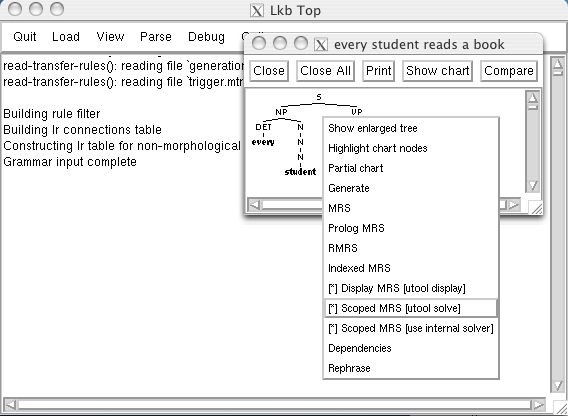
Alternatively, if you load the file
lkb-utool-menu.lisp into the Lisp console, two new
commands are added to the context menu for parse trees (see
Fig. 2). The command “Scoped
MRS (utool solve)” calls Utool to compute all scopings of the MRS
for this parse tree, in the same way as just described. On the
other hand, the “Display MRS” command will ask the Utool Server to
perform a display command for the given MRS. You can
then solve and further manipulate the USR from the GUI. As before,
these commands also make the assumption that a Utool Server is
running on the local machine, port 2802.
If your Utool server is running anywhere that’s not
localhost:2802, you can change the host and/or port
by setting the variables utool::*utool-host* and
utool::*utool-port* to the values you want in the
Lisp console.
One thing to keep in mind when using LKB together with Utool is that LKB seems to use the Latin-1 character encoding when sending USRs over the socket. It would be nice if LKB could be made to send UTF-8, but we haven’t managed to figure out how this is done. However, you can always make Utool expect the Latin-1 character encoding, as described in Section 5.1.
Extracting USRs from a HPSG treebank
The English Resource Grammar (ERG; ) is distributed together with a collection of hand-annotated corpora that contains for each sentence from the corpus the preferred syntactic analysis and a corresponding underspecified semantic representation based upon MRS. These corpora are extremely valuable resources because corpora with deep semantic information are so very rare, and we have occasionally used them in experiments (Fuchss et al. 2004; Flickinger, Koller, and Thater 2005).
In order to use the MRS structures in these treebanks from
within Utool, it is necessary to extract them from the treebank
and save them in individual files. This can be done by using the
script extract-gold.lisp, which can be found in the
directory tools/lkb in the Utool jar file. Proceed as
follows:
Start the LKB system.
Locate the treebank file on your filesystem. Here we will assume that we are working with the Rondane treebank, which is located in erg/gold/rondane under the main ERG directory. The
rondanedirectory contains a fileresult.gz, which contains the actual annotations and has to be unzipped first.Run the following commands in the LKB’s Lisp console:
(load "extract-gold")
(utool::extract-prolog "erg/gold/rondane/result" "target-directory")
You need to replace
target-directorywith the name of the directory in which you want the individual MRSs stored. This will create a number of files with the extension.mrs.pl, one for each sentence in the treebank. These files are suitable for reading with themrs-prologinput codec.If you want MRSs in XML format instead, call
utool::extract-xmlrather thanutool::extract-prolog. The arguments of both calls are the same.If you pass the additional argument
:solve tto theextract-prologcall, the MRS constraint solver is applied to each MRS expression, and the number of fully scoped MRS expressions is stored in a filelogin the target directory. This can be useful to compare the results of the MRS solver and Utool, but can take quite a while.
The extract functions will work with the treebanks
that are distributed together with the ERG under the
erg/gold directory, but they will not work directly
with the Redwoods corpus (Oepen et al. 2002),
which is distributed separately and uses a different internal
format. See e.g. http://wiki.delph-in.net/moin/RedwoodsTop for more
information about the Redwoods corpus, and how MRS structures can
be extracted.
Benchmarks
Utool is the fastest solver for underspecified descriptions in the formalisms of dominance constraints, dominance graphs, Hole Semantics, and MRS that exists today. This is supported by theoretical complexity results (Althaus et al. 2003; Bodirsky et al. 2004; Koller and Thater 2005), and we have previously claimed practical efficiency in various publications.
We will now sketch how such claims of practical efficiency can be substantiated. In doing so, we will also establish the fact that the Java implementation of Utool is not slower than the earlier C++ implementations of Utool under Linux and Windows, and is in fact a little faster on Windows. We will not report detailed results for MacOS, but the situation is roughly that Java on PowerPC Macs seems to be very slow, but the performance on Intel Macs seems to be comparable with the other platforms on the same processor.
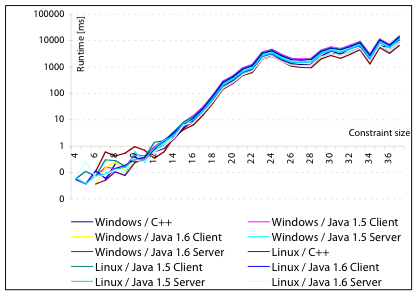 |
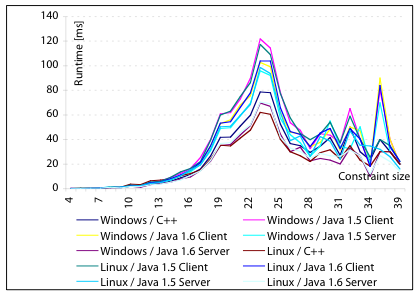 |
solvable (left)
and solve -n (right) of Utool 2.0.1 (C++) and 3.0
(Java) on Windows and Linux. As our benchmark example, we chose the Jotenheimen corpus, which like the Rondane corpus (cf. Section 5.4 above) is distributed together with the English Resource Grammar. The corpus contains analyses for 5135 sentences together with corresponding semantic representations based upon MRS. We extracted the MRS structures as described in Section 5.4 above and translated them into dominance graphs. Of the 5135 MRS structures in the corpus, 441 could not be translated, so we base the evaluation on a dataset of 4694 dominance graphs.
Then we ran the commands utool solvable (measuring
how long it takes to compute the chart and count all solved forms)
and utool solve -n (measuring how long it takes to
compute the chart and then extract all solved forms, without
actually encoding or displaying them) on all dominance graphs with
at most one million solved forms. We did this using both Utool
2.0.1 (the last C++ version) and Utool 3.0 (the first Java
version) on all sentences. We ran Utool 3.0 in server mode (using
utool server) to eliminate the overhead for starting
up the JVM.
We performed the benchmarks using a machine with a Pentium M
processor at 1.6 GHz, both on Windows XP Professional and on Linux
2.6.10. Utool 2.0.1 was compiled with Gnu C++ 4.0 under Linux and
with the C++ compiler from the Microsoft Visual C++ Toolkit 2003.
We ran Utool 3.0 both using Java SE 5.0 and using a beta version
of Java SE 6.0; in both cases, we ran the JVM both in client and
in server mode (with the -server JVM flag).
The results of these benchmarks are shown in Fig. 3. Both charts plot the size of the underspecified description (number of fragments in the dominance graph) on the X axis and the mean runtime for USRs of this size on the Y axis. Notice that the Y axis is logarithmic in the left-hand picture. Looking at the charts, we can make the following observations:
The mean time for computing a chart is dramatically lower than the time for enumerating all solved forms. This is unsurprising, as the number of solved forms of a graph is typically much higher (and grows much faster with the graph size) than the number of splits in its chart (Fig. 4).
Running Java in server mode is generally much faster than running it in client mode.
Even the beta version of Java 6.0 is noticeably more efficient than Java 5.0.
The difference in performance between Utool 2.0.1 and Utool 3.0 running on Java 6.0 in server mode is negligible under Linux. Under Windows, the Java version is more efficient (although it is conceivable that the Visual C++ compiler supports optimisations that we weren’t aware of).
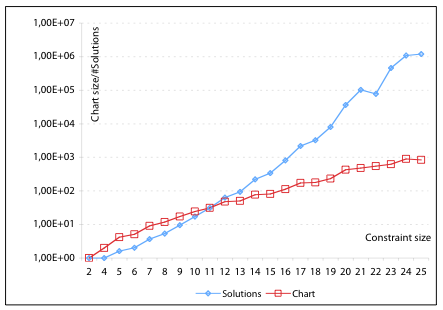
Building Utool
So far, we have focused on how to use the complete Utool system
as you download it, unchanged. This is sufficient in many
scenarios – you can access Utool from the command line, you can
connect to it as a server, and you can even implement your own
Java classes that use our classes directly and add new codecs, as
long as you simply add Utool.jar to your classpath.
But there may be a point at which you want to recompile Utool. For
such cases, we will now document how to unpack the Utool source
distribution and recompile it.
The Jar file Utool-<version>.jar which you
probably downloaded from the website only contains the compiled
class files that are necessary for running the programme. This is
the standard distribution because it is pretty small, and thus
downloads and loads quickly.
If you want to recompile (parts of) Utool, you will need to
download the source distribution. The source distribution has a
filename of the form Utool-src-<version>.jar,
and is some 4 megabytes in size. In addition to the Utool classes,
it contains the source code of Utool, all classes of the iText,
JGraphT, JGraph, and Getopt libraries that we use, and the javacc
and testng Jars that are used in compiling Utool. The files in the
source distribution Jar are in exactly the same locations as in
the ordinary Jar, so in particular you can use the command
java -jar Utool-src-<version>.jar to run Utool.
In addition, you need the Java JDK 5.0 or higher, and you need
Apache Ant 1.6 or higher.
Recompilation of Utool from the source distribution proceeds as follows:
Unpack the Jar file in a new directory:
$ jar xf Utool-src-<version>.jarPrepare for compiling by moving all files to the directories where the build script expects them:
$ ant prepareChange or add classes as you like. The source code of all classes is under the directory
src. If you add new classes, you may have to edit the Ant build script in build.xml.Recompile as follows:
$ antThis will create the file
Utool-<version>.jarin the directorybuild/lib, which you can run usingjava -jaras before.
Conclusion
In this document, we have described Utool, the Swiss Army Knife of Underspecification. In particular, we have explained how to use Utool and how to extend Utool, and listed some tips and experiences on using Utool in practice.
We are sure that there are many things that we can improve. We would therefore greatly appreciate any comments or suggestions that you might have. Please send them to koller@coli.uni-sb.de, and we will try to take them into account for the next version.
In addition, we would be thrilled to hear about your experiences in using Utool. If there is something about it that you like, if you use it in a way that we hadn’t envisioned, or if you find bugs, please send us an email and give us some feedback. In addition, if you write code that has anything to do with Utool (such as a front-end for using it from another programming language), we would be excited to include it in a future release as a contributed component.
We hope you will enjoy using Utool!